| https:///weradocs/WeraDesk_30/WeraDesk_Scripts.shtml |
To configure complicated schedule lists of mixed acquisition modes and use WeraDesk for this, go through the following procedure:
0,10,20,30,40,50,0 0,1 * * * /home/wera/weractrl/stm /home/wera/weractrl/sort_data.cpy /home/wera/weractrl/cron_script s > /home/wera/weractrl/cron_script.log 10,20,30,40,50 2 * * * /home/wera/weractrl/stm /home/wera/weractrl/sort_data.cpy /home/wera/weractrl/cron_script s > /home/wera/weractrl/cron_script.log 0,10,20,30,40,50,0 3,4 * * * /home/wera/weractrl/stm /home/wera/weractrl/sort_data.cpy /home/wera/weractrl/cron_script s > /home/wera/weractrl/cron_script.log 10,20,30,40,50 5 * * * /home/wera/weractrl/stm /home/wera/weractrl/sort_data.cpy /home/wera/weractrl/cron_script s > /home/wera/weractrl/cron_script.log 0,10,20,30,40,50,0 6,7 * * * /home/wera/weractrl/stm /home/wera/weractrl/sort_data.cpy /home/wera/weractrl/cron_script s > /home/wera/weractrl/cron_script.log 10,20,30,40,50 8 * * * /home/wera/weractrl/stm /home/wera/weractrl/sort_data.cpy /home/wera/weractrl/cron_script s > /home/wera/weractrl/cron_script.log 0,10,20,30,40,50,0 9,10 * * * /home/wera/weractrl/stm /home/wera/weractrl/sort_data.cpy /home/wera/weractrl/cron_script s > /home/wera/weractrl/cron_script.log 10,20,30,40,50 11 * * * /home/wera/weractrl/stm /home/wera/weractrl/sort_data.cpy /home/wera/weractrl/cron_script s > /home/wera/weractrl/cron_script.log 0,10,20,30,40,50,0 12,13 * * * /home/wera/weractrl/stm /home/wera/weractrl/sort_data.cpy /home/wera/weractrl/cron_script s > /home/wera/weractrl/cron_script.log 10,20,30,40,50 14 * * * /home/wera/weractrl/stm /home/wera/weractrl/sort_data.cpy /home/wera/weractrl/cron_script s > /home/wera/weractrl/cron_script.log 0,10,20,30,40,50,0 15,16 * * * /home/wera/weractrl/stm /home/wera/weractrl/sort_data.cpy /home/wera/weractrl/cron_script s > /home/wera/weractrl/cron_script.log 10,20,30,40,50 17 * * * /home/wera/weractrl/stm /home/wera/weractrl/sort_data.cpy /home/wera/weractrl/cron_script s > /home/wera/weractrl/cron_script.log 0,10,20,30,40,50,0 18,19 * * * /home/wera/weractrl/stm /home/wera/weractrl/sort_data.cpy /home/wera/weractrl/cron_script s > /home/wera/weractrl/cron_script.log 10,20,30,40,50 20 * * * /home/wera/weractrl/stm /home/wera/weractrl/sort_data.cpy /home/wera/weractrl/cron_script s > /home/wera/weractrl/cron_script.log 0,10,20,30,40,50,0 21,22 * * * /home/wera/weractrl/stm /home/wera/weractrl/sort_data.cpy /home/wera/weractrl/cron_script s > /home/wera/weractrl/cron_script.log 10,20,30,40,50 23 * * * /home/wera/weractrl/stm /home/wera/weractrl/sort_data.cpy /home/wera/weractrl/cron_script s > /home/wera/weractrl/cron_script.log 0 2,5,8,11,14,17,20,23 * * * /home/wera/weractrl/stm /home/wera/weractrl/cal_data.cpy /home/wera/weractrl/cron_script s > /home/wera/weractrl/cron_script.log |
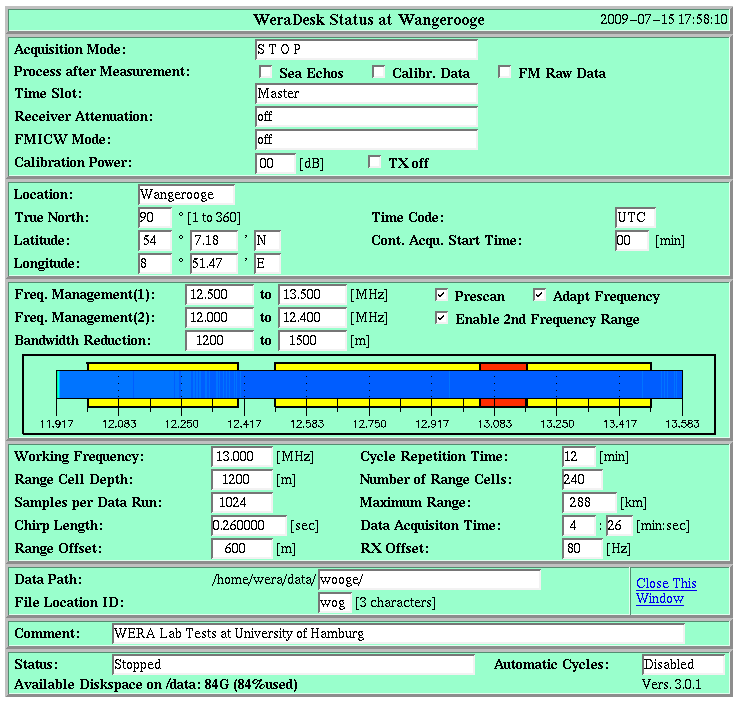
The above example schedules normal radar runs every 10 minutes and switches to one calibration cycle at the beginning of every 3 hours. Note, that with this manually installed crontab file, the WeraDesk Status page will only show the left side of the status line correctly. The right side will continue to show 'Disabled' (because you did not start the crontab through WeraDesk) and the rest of the fields will show the last measurement mode you configured. Do not start any measurements from WeraDesk until you remove the crontab file again ('> crontab -r') or ensure that the measurement started from WeraDesk does not overlap with the timeslots defined by crontab.
You can also edit /home/wera/etc/WeraDesk.tmp manually (look at the instructions) and run /home/wera/public_html/cgi-bin/Proc_WeraDesk on that modified file.
Another (more complicated) possibility is to write a program, that creates the extended Header data structure at /home/wera/weradesk/ctrl_data.cpy and calls mkcron afterwards.
| BACK |